
Udio – AI Music Generator
Udio is an AI-powered music generator with huge creative potential. In this overview, you’ll find its features, Advantages & Disadvantages, legal considerations, our opinion, and a direct link to the platform.
 How to Use Udio?
⬇ You can start creating music for free by clicking the link below.
Try Udio for Free
✅ Freemium tool with a limited free plan.
ℹ Works directly in your web browser.
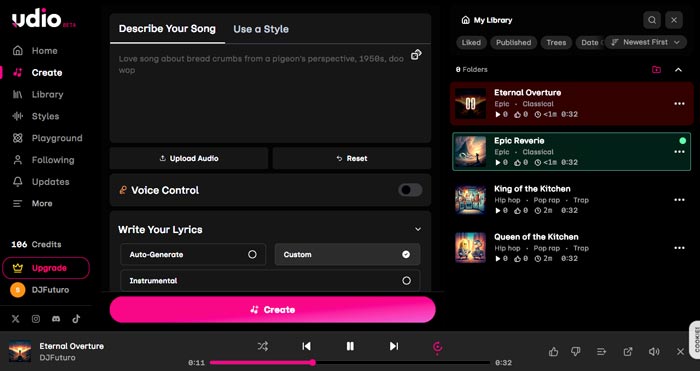
Features & Capabilities:
- Generate full songs from a simple text prompt.
- Produces realistic human vocals.
- Also writes lyrics based on your themes or ideas.
- Includes editing and production tools such as pitch adjustment, stem separation, remixing, and track extension.
- Create music inspired by another audio clip (Audio to Audio): upload an audio sample and let the AI generate new music based on its vibe.
- Uses a credit-based system, each generation consumes credits.
- The free plan offers daily and monthly credits, though with limitations.
- Includes a social component where you can discover other users’ creations and share your own.
Legal Notes:
There has been controversy around AI-generated music. Udio reached an agreement with Universal Music Group (UMG), mainly affecting training data practices. There are also rumors about a potential new joint platform.
The platform previously offered commercial licensing, but this is currently under review and downloads are temporarily disabled. We recommend staying updated on the latest changes — we’ll update this note once everything is officially clarified.
Advantages & Disadvantages:
- Fast generation of complete songs with vocals and lyrics.
- High-quality music output.
- Includes advanced music-editing tools.
- Audio to Audio functionality.
- Frequent model improvements.
- Current legal disputes may cause temporary uncertainty, though they seem likely to be resolved.
- These disputes have resulted in temporarily pausing downloads.
Frequently Asked Questions – FAQ:
DJFuturo’s Opinion
A platform with AI models that offer tremendous creative potential. It includes powerful features that make music creation accessible to everyone.
We simply recommend staying informed about legal updates and avoiding music that too closely resembles well-known artists.
Alternatives to Udio:
- Suno – The leading platform for AI-generated music. A top-tier competitor.
- Check out our ranking of the Best AI Music Creation Platforms.
Other Versions Available:
Udio – Genera Música con IA [ES] | Udio – Générateur de Musique par IA [FR] | Udio – Genera Musica con AI [IT] | Udio – Gerador de Música com IA [PT-BR]
Leave a Reply