
Flat: Music Score and Notation Editor (Online & App)
Discover Flat, an online music notation software that enables real-time collaboration between users. You can access it through your web browser or via its Android and iOS apps.
 What is Flat?
Flat is an online sheet music editor that lets you create, play back, and collaborate on scores directly from your browser or mobile app. Scores are saved in the cloud and remain accessible across multiple devices.
⬇ Access the version that best fits your workflow, whether you prefer using the web browser version, an Android device, or an iOS device like iPhone or iPad.
Open Flat Online (Sheet Music Editor)
Download Flat for Android (App)
Download Flat for iOS (App)
✅ Links come from official sources.
ℹ Flat offers a free version with limitations, as well as a paid plan with full features.
ℹ For the apps: Android 7 or later and iOS 15 or later are recommended.
Features and Capabilities:
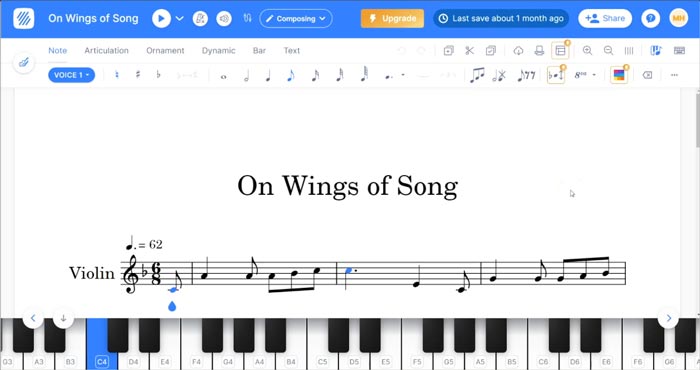
- This is an online sheet music editor that works directly in your browser, no installation required.
- It’s also available as dedicated apps for iOS and Android (see versions above).
- It’s an intuitive tool. Compared to other music notation software, you can start using it quickly and easily.
- Sheet music editing:
- Create scores, share them, and play them back using virtual instruments.
- All scores are saved in the cloud and accessible from any device.
- Enter notes using mouse and keyboard, touchscreen input, virtual instruments, or MIDI keyboards.
- Supports both basic and advanced music notation.
- Includes guitar tablature support.
- Score playback:
- Includes a wide range of virtual instruments (30 available for free and 150+ with paid plans).
- Mix individual instrument tracks independently.
- Apply effects such as reverb.
- Supports real-time collaboration between users, one of its standout features.
- Supports PDF, MIDI, MusicXML and exports audio in MP3 and WAV formats.
- Includes a large community sharing resources and sheet music.
- The free version allows up to 15 saved scores.
DJFuturo Review:
One of Flat’s biggest strengths is how quickly you can start using it without installing anything, perfect for capturing ideas fast. It’s also intuitive and easy to use, which isn’t always the case with sheet music editors. That said, it doesn’t include as many advanced features as some alternatives, especially in the free version.
It’s also highly recommended for students.
Also check out:
- Discover NoteFlight — An online alternative to Flat
- Download LilyPond — A free text-based sheet music creation program
- Best apps for writing sheet music
Other Versions Available:
Flat – Editor de Partituras [ES] | Flat – Éditeur de Partitions [FR] | Flat – Editor di Spartiti [IT] | Flat – Editor de Partituras [PT-BR]
Leave a Reply