
Noteflight – Music Notation (Online Editor)
Discover Noteflight, the online music notation platform and score editor. Learn about its key features, our review, and access the tool.
 What is Noteflight?
Noteflight is a browser-based music notation software with playback and collaboration features, accessible directly online without installation. It works on both desktop and mobile devices.
⬇ Access the platform below.
Open Noteflight Online (Music Notation Editor)
✅ Noteflight includes a free version with some limitations.
ℹ Save up to 10 scores with the free plan.
ℹ Works on desktop and mobile devices directly from your web browser, no installation required.
Features and Capabilities:
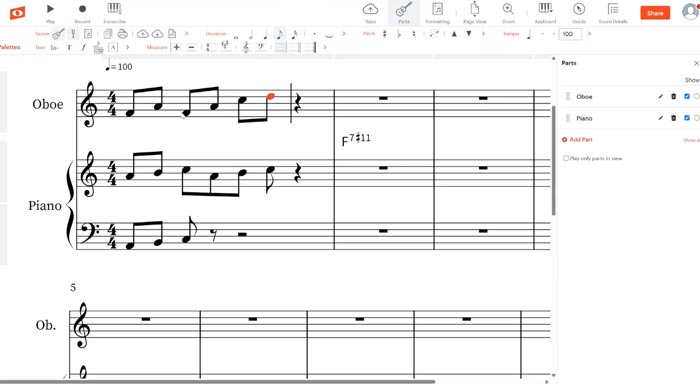
- The graphical editor is simple and user-friendly, making it ideal for beginners learning music notation.
- Score editing tools:
- Supports most standard music notation elements.
- Notes can be entered using different input methods (mouse, computer keyboard, or MIDI keyboard).
- Includes templates for a wide range of instruments and ensemble setups.
- Playback features:
- Includes built-in instrument libraries for score playback.
- Offers effects and basic mixing options.
- Supports playback by instrument sections, solo playback, and full ensemble playback.
- Useful for reviewing and correcting your scores.
- Includes built-in instrument libraries for score playback.
- Scores are saved in the cloud, making them accessible from any device.
- Collaboration features:
- Scores can be shared with other users.
- Supports real-time collaborative editing.
- Allows comments and annotations.
- Includes a built-in community sharing space where users can share resources such as scores and exercises, and interact with other musicians.
- File compatibility: PDF, MusicXML, MIDI, and audio.
- Supports integration with the online DAW Soundtrap for music production workflows.
- Widely used in music education, with dedicated education plans available.
Frequently Asked Questions (FAQ):
DJFuturo Review:
Noteflight is especially well suited for music education and is generally well received by teachers and beginner users. It’s easy to get started compared to other music notation programs.
However, it may not be the best option for advanced users, as it can feel limited when working with complex scores or when more realistic playback is required.
See also:
- Discover Flat – An alternative to Noteflight, another online music notation editor with a dedicated app
- Download Sibelius – One of the leading professional music notation software solutions
- Download Finale – A classic top-tier scorewriting program
Other Versions Available:
Noteflight – Notación Musical [ES] | Noteflight – Notation Musicale [FR] | Noteflight – Notazione Musicale [IT] | Noteflight – Notação Musical [PT-BR]
Leave a Reply